
New Feature: Custom email domains

For the past year we have been working hard to put together another huge release of feature updates this summer. I’m excited today to make our first announcement: Custom email domains.

No other company comes close to providing the suite of branded features we provide, and today we demonstrate our world view even further by allowing you to verify ownership of one or more domains, add multiple signatures to those domains, and choose the signature you want use when sending any email.

Once you’ve added your signatures, you can choose which email you want to use for notifications sent from your business to your customers.

Easy Setup

Setup is quick and easy. Start by clicking the “Get Started” button. This creates a dedicated email service for your studio.

Next you’ll add your domain.
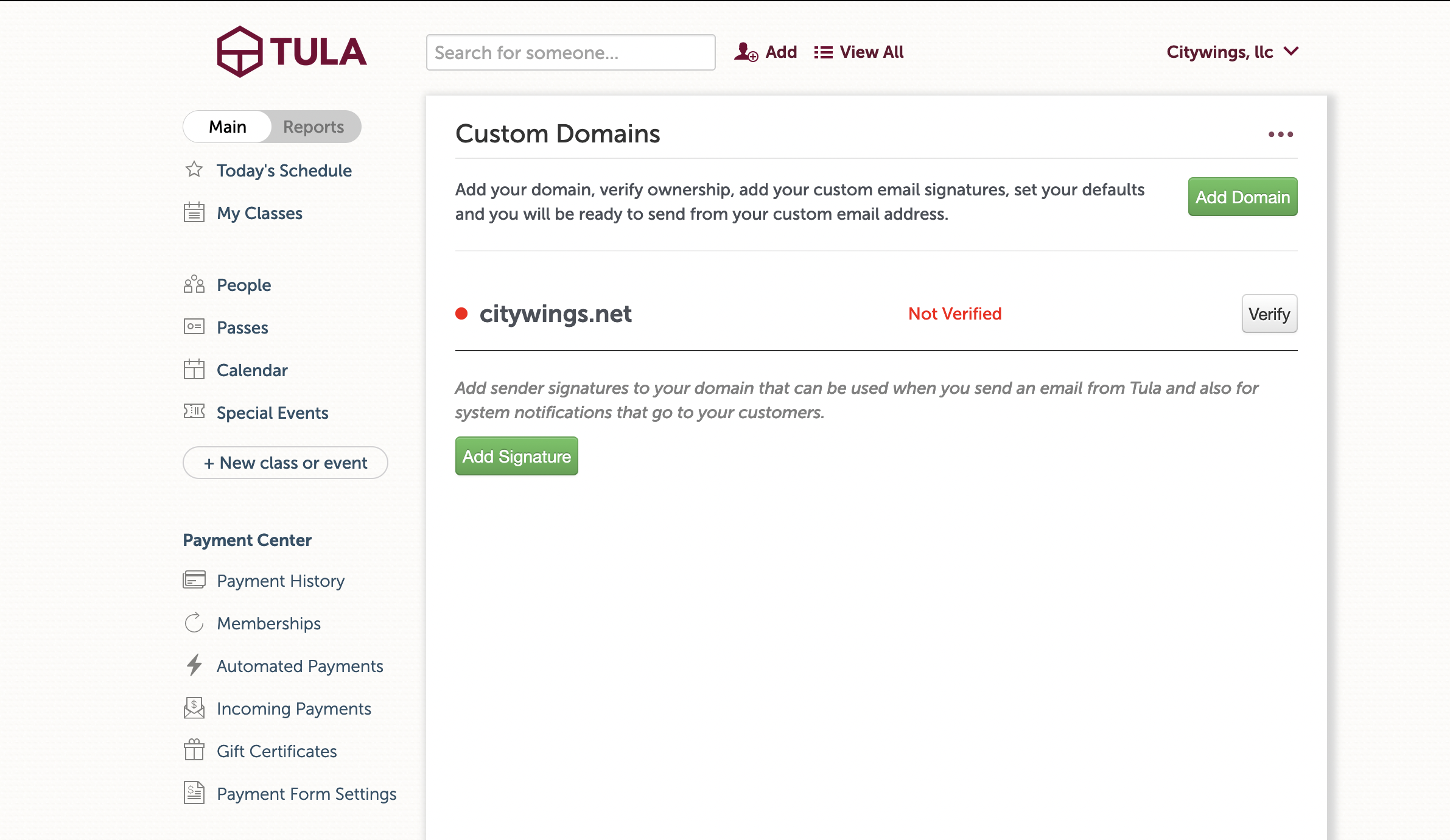
Once you add your domain, click verify to expose the verification information. You will create one text record and one CNAME record.

Once verification is complete, you can add your signatures for the domain.

If you add more than one signature, choose which to use for notifications from your business to your customers. (Things like registration confirmations, receipts, etc.) You can access the Notification Defaults page using the menu in the upper right.

For your group emails, the system works the same as it always has, but now you’ll choose the sender signature to use.

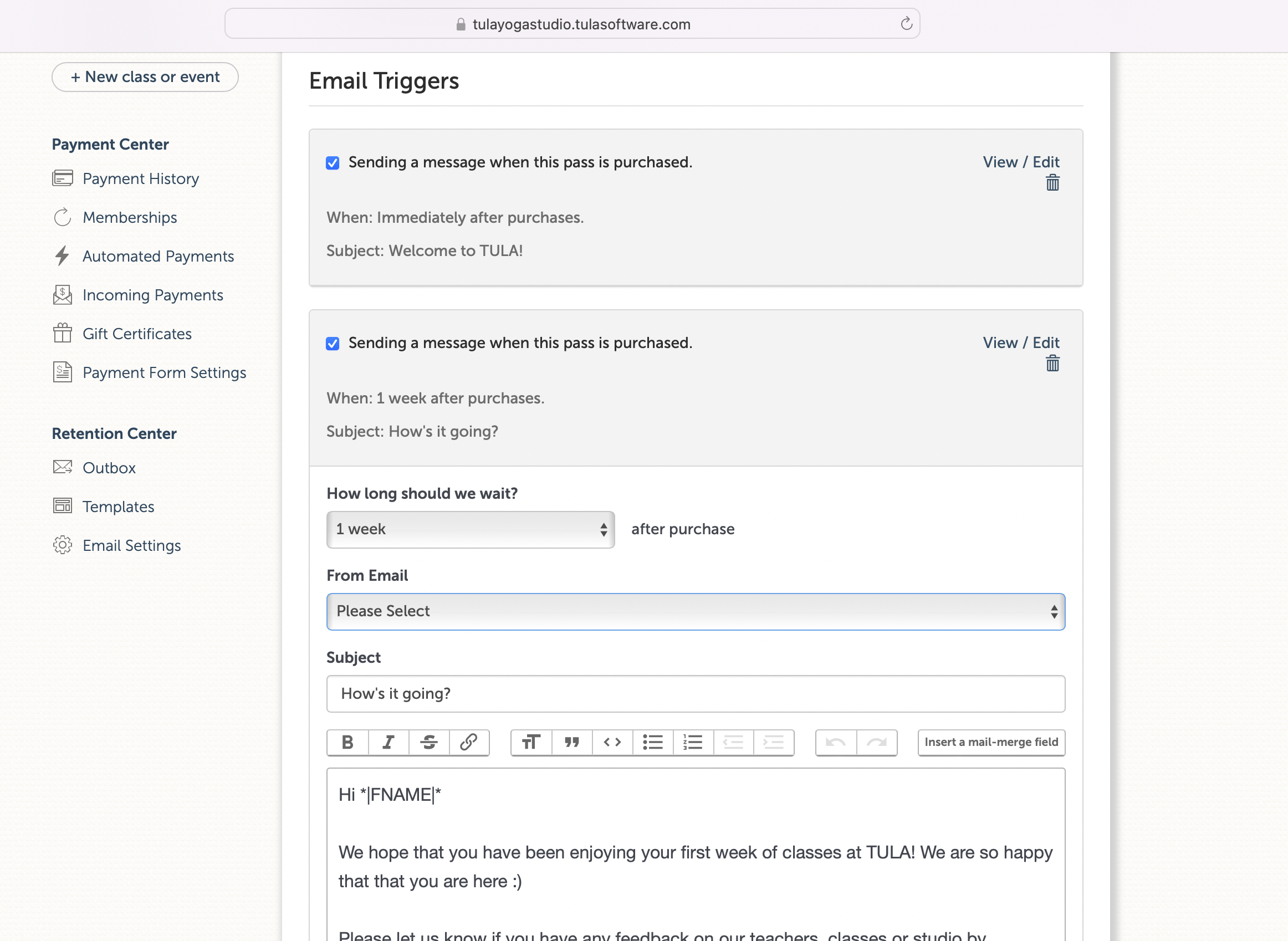
Likewise, when setting up email triggers on your passes, you can choose the sender here as well.
Longtime customers of Tula know we obsess over how your business is able to present itself to your customers. While we’ve had custom domains for your website integrations and custom mobile apps that live on your domain for a while, there’s been this one missing piece.

Available today for everyone

We’re thrilled to provide this massive upgrade today, and is available on all plans for every customer.


🥳 New Feature: Student Referral System

We’re thrilled to announce our newest feature, the Student Referral System. The Student Referral System allows your students to quickly and easily create their own referral pages right from their profile pages, both in your instant apps and on the student access widgets within your websites.

How it works

Students can quickly and easily activate their referral urls on their profile pages, both in your app, or on the widget in your website.

To activate their referral url, students do only three things:

  1. set their custom url, which defaults to firstname_lastname

  2. Say what they love about your studio - limited to 140 characters

  3. Upload a profile photo

Once they’ve done the above, they’ll have access to their personal referral link.

Activate your referral url

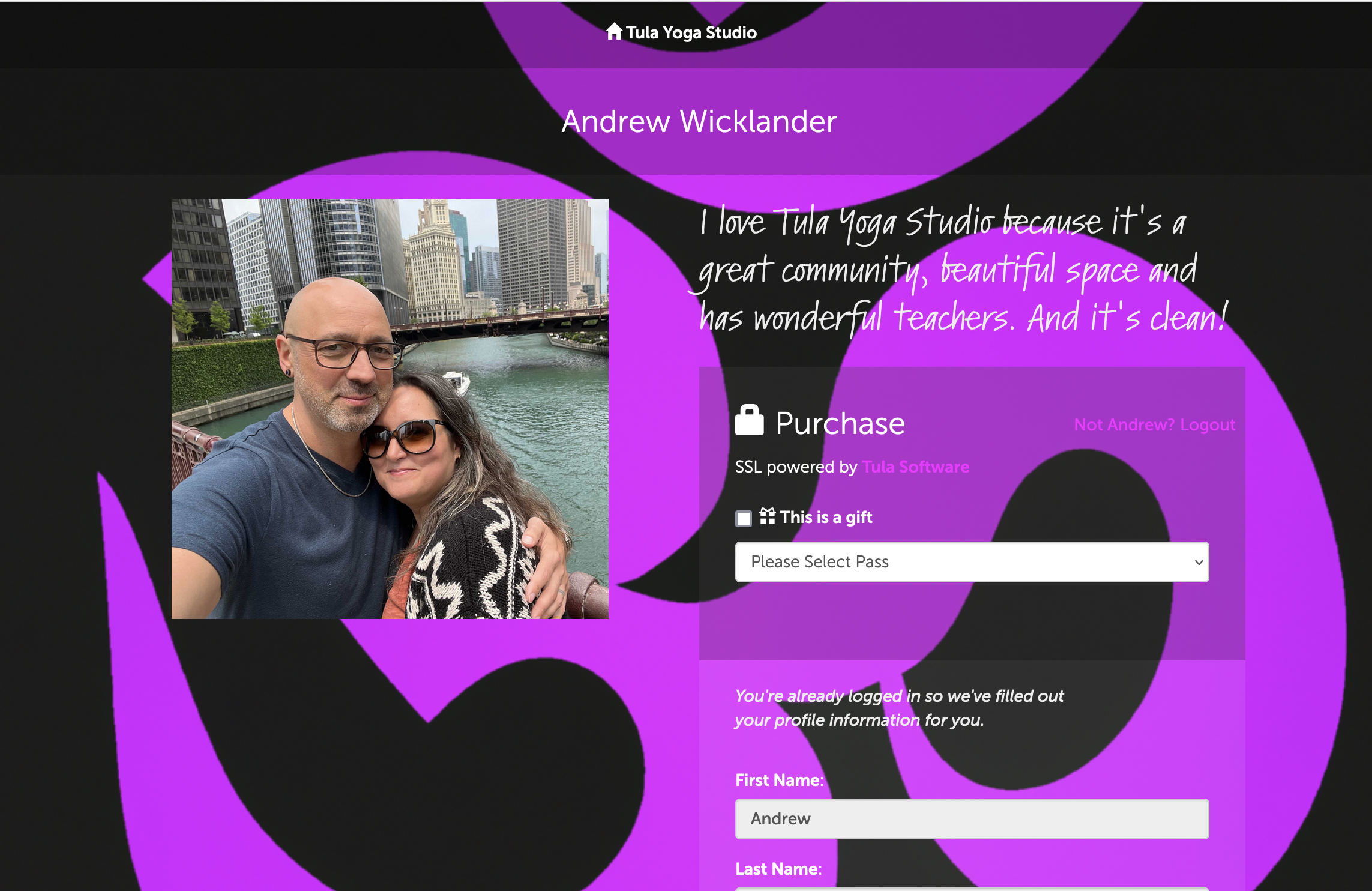
Once created, the referral pages live on your domain. Here’s my referral page for Tula Yoga Studio. (screenshot below)

A view of a public referral page

Shared Links

When your student share a link with their friends over messages and social media, we’ll render their quote, along side your logo.

Your Brand. Your Domain.

Because these pages live on your custom sub-domain, they inherit the custom brand and color settings from your instant apps. This means when students share their referral urls, they’re not just sending people to some random website. Their landing on a page on your domain, with your brand and your design, that also has your full calendar, pass offerings and on-demand library.

Choosing Passes for Referral Pages

On the admin side of things, it’s just as easy for you. Quickly choose which passes you want to be available on referral pages on the Payment Form Settings page.

Choose which passes you want to show on referral pages.

Tracking Referrals

And for tracking referrals, it’s just as easy for you. Our new referrals report shows you everyone who had a referral within a certain date range. Click on their name to drill-down and see their exact referrals.

Referral Tracking

Endless Opportunity

Everyone knows that the best type of referral is word of mouth, and this feature makes it even easier for your students to tell others how much they love you. The implementation allows you to be as creative as you want, to encourage your students to refer their friends to your studio. Hold contests, come up with rewards and create other incentives to encourage your students to share the love of your studio. One idea Maile is kicking around is giving special keychains to people who refer a certain number of people. And maybe a different reward once you reach a certain number of attendances and a certain number of referrals.

You get the idea, the opportunities are endless!

We hope you love it

We’re proud of this feature because it’s yet another way to highlight the degree to which we listen to our customers and the larger community, and the lengths we go to, constantly, to ensure we’re always working hard to promote your studio and your brand.

To all our customers, as always, thank you, it is an honor to work hard for you every day.

💥 New Feature: ⚡️ Instant Custom Apps

I'm so excited to announce our newest feature: Instant Custom Apps. Instant Custom Apps allows you to create a custom branded app for your business instantly, using nothing but your natural language. These custom apps live on your own domain, and take advantage of the custom subdomain you've already set up to host your widgets on your website. Instant Custom Apps put your schedule, payments, account management, on demand video and AI powered chat search all in the hands of your students for quick, immediate access to everything your studio offers.

Instant Custom App is available today for all our customers on every plan.

How it works

Say what you want, and an image or code will be generated. We’ll show you the code that’s generated in real-time!

The first thing you do when you create your Instant Custom App is decide whether you want a background image, or more of a code-designed background. For both, we've integrated with OpenAI's API's: Dall-E2 for images and GPT4 for CSS code. Image backgrounds are great for complex imagery, while code only backgrounds work great for things like gradients and animations. We’ve used both of them during our testing to make hundreds of beautiful versions.

Prompt: An animated gradient background using Purple and Red.

Prompt: A splash of red and purple, with a touch of gold, on a cream colored wall reflecting beauty, wellness, abundance, empathy, care, community and happiness. In the style of monet.

Once you've generated your background it's time to perfect your landing page. Customize the title, footer menu and icons to your liking and you're all set.

Next, it's time to detail the internal pages. This will update colors for the schedule, payment form, etc. You can get pretty detailed on this page, customizing both the header and footer, icon colors, primary and secondary font colors and link colors, and you can control the opacity for all three of the background, header and footer. This allows you to make full use of all the different imagery the AI may provide you with.


The combination of all these elements allows you to create an app for your students that's uniquely you and your business. And, which you can easily and quickly change as often and as quickly as you like.

Oh and don’t forget to upload your logo! That’s what we’ll render on your student’s home screens when they save your app to their home-screens.

Years of effort, coming together today.

It's been over a year since we announced our departure from app stores, instead favoring the open web. While we didn't know exactly how things would play out, the commitment I made - to myself as much as our customers to be totally open - is that ultimately we would come out with something not just sufficient, but competitively better. We believe we have achieved that with this update.

In an instant you can create, customize and publish an app that lives on your domain, works on every device and which can be updated constantly. We have written about how app store business models are outdated in a hybrid world, and how they break the hybrid opportunity independent operators in the industry have, by fracturing their schedules and their passes.Our

Tula customers are able to provide thier customers with a unified schedule, passes that give access all types of classes, a full on demand library and AI powered search chat - making years worth of videos instantly available.

Thank you to our customers!

There are businesses on our platform who have been customers for over ten years. Every day, we work hard to bring you the best the internet has to offer, so you can bring your customers the best that you offer.

This is our best work, and we couldn’t have done it without you.

Thank you.


🎉 New Features! Manager Permissions, On-Demand Tag Overrides, AI Personalization and more!

Coming on the heels of our update from a couple weeks ago, we’re happy to announce another set of new features. Many of these are requests from our customers so thank you for the ideas!

Image generated with Dall-E2 with prompt from GPT-4

🔑 Manager Permissions
We’ve introduced a new permission level called "manager," which expands upon the capabilities of the Desk role. The primary difference between these roles is that the manager now has the ability to view your full People page, has access to the retention center and can send emails on behalf of the studio. This role does not include access to other reports or financial information. This gives you a little more control and flexibility for teams with varying levels of responsibility.

🏷️ Tag Override for On-Demand Settings
This update to the event recording page allows you to leverage user tags to provide access to your video library to people who may not have an unlimited pass or an on-demand pass, giving you much more finite control over who can and who cannot access your recordings.

Now you have four options to choose from:

  • OPEN
    Anyone logged in can access your on-demand library.

  • UNLIMITED + ON-DEMAND
    People with unlimited credits or an on-demand pass can access your on-demand library.

  • UNLIMITED + ON-DEMAND + TAGS
    People with unlimited credits, an on-demand pass or a selected user tag can access your on-demand library.

  • ON-DEMAND + TAGS (exclude unlimited)
    People with an on-demand pass or selected tags can access your on-demand library (prevents even people with unlimited passes from access).

📊 Pass Funnel Enhancements
We enhanced the recently introduced Pass Funnel report by introducing a drill-down feature, allowing users to open up a row and view the exact purchases someone made. This gives you immediate insight into individual transaction information following a particular campaign you might be tracking. Additionally, we implemented a fix to ensure the total attendance count is displayed for the chosen pass when running the report. (Previously we were only showing the individual row total)

🧠 Personalized AI Completions
The AI-related feature we released last month allows your students to conduct a sort of “natural language search” against your video library. Now, we’ve made it possible for users to set the style and tone of AI-generated results by enabling custom prompts to be sent at the studio account level. This update empowers our customers to tailor the AI's output to their specific needs, ensuring a more personalized and engaging interaction for your students. As an extreme example, even though we market ourselves to yoga studios, one of our customers is a flight school (we can be used for any class based business) and so their natural language page has been updated to act as a flight instructor, which allows their students to ask questions about aviation and help them acquire the skills they need. The point I’m trying to make is we can completely and totally tailor this page for your needs.

🙏 Thank You
As always thank you to our customers. We’re always working on new features, and can't wait to share more with you next month!