
Introducing Advanced Registrations with Payment Requirements

One of the toughest problems we've had to sink our teeth into is registrations. Making it even tougher is our belief that your students shouldn't be required to create accounts with us, just to interact with your business. And making it tougher still is the fact that many of our customers have been asking for the ability to require payments to certain classes, in order to allow students to register for them.

We've been thinking about this problem for a long, long time.

A new solution is here!

Today we are proud to announce an entirely new set of features to the Tula registration system that will allow you to do the following:

  1. Continue to accept immediate registrations by your students, whether logged into Tula or not.
  2. Continue to accept payments from students via the payment form, without requiring login.
  3. New Feature: Require a student to have credits on file in order to register for a class
  4. New Feature: Prompt a student to purchase a pass if they go to register for a class that requires payment
  5. New Feature: Prompt students to register for classes after purchasing a pass via the payment form.
  6. New Feature: Allow you to mark a student as a no-show, which will remove a credit from their account, but keep them from counting as an attendance in your reports.
  7. New Feature: Allow admins and desk people to close registrations on a class whenever they like.
  8. All of the above available for both regular classes and special events

Together, this new set of features represents the single largest release we've ever put together, but what makes us so happy, is that in order to begin leveraging this new functionality, all you need to do is edit a class, and click on a radio button. 

That's it. To begin requiring payment for any of your classes, all you need to do is edit the class, and choose to require payment in order to register.

How it works

When you create or edit a class, in addition to the Calendar Settings you've always had, there's now one more option: "Require payment in order to register?". When "Yes" is selected to require payment, we will only allow a student to register for a class if they have credits on file.

Importantly, this means that if they attempt to register for a class and they are not logged in, they will have to log in, so that we know their current credit count. 

Directing your students around your website

With this new functionality, you might want to consider updating the language on your websites in certain places. 

For new students, you'll want to point them to the payment form, as they don't have accounts yet. Our payment form has been modified so that once someone purchases a pass, they can register for the number of classes equal to the pass they are purchasing. For example, if you have a special event series with 5 classes, and someone buys a 3-pack to that special event, they'll be able to register for up to 3 classes in that special even series.

For existing students, while they can of course use the payment form, if they log in they'll be able to register for classes with the click of a button, they'll be able to instantly make payments if they're out of credits, etc.

In short, when requiring payment in order to register for a class, send new students to your payment form and send existing students to the calendar.

Screenshots

Check out some screenshots below with annotations, to see the different views people will get based on whether they're logged in, logged out, using the calendar or using the payment form.

Enable all these features by clicking a single radio button!

Loads of features enabled by answering a single question!

Loads of features enabled by answering a single question!


Changes to iOS available soon

These changes are all accounted for on the iOS applications, however if you require payment for a class, your students on iOS that don't have credits will simply not be able to register. Our updated app will be available soon, but it's pending Apples approval. 

We have a philosophy that the browser doesn't wait for iOS, so while your students won't be able to register for classes that require payment, they won't get proper error messages until our newest version is approved. We don't like to have breakages anywhere, but we were willing to make this trade-off to get the feature out today.

More work to do!

As large as this release is, we still have a lot more features, functionality and refinements that we'll continue to bring! Please let us know what you like, what you want improved and how you're using this in the wild. We can't wait to hear what you think!

One Final Feature!

As a result of doing all this work, we're able to give you one final feature a lot of you have been asking for - the ability to create multiple payment forms with specific passes on them available for purchase. We're considering this a power user feature and it's sort of hidden in the website widgets section.


By going to the custom form builder, you can create and build a payment form with a set of passes, and, you can put a custom prompt in the dropdown that prompts people to make a purchase.

To all of our customers that have asked for these features so they can run their businesses better, we send you a huge thank you! We couldn't build this without you!

Introducing Rapid Credit Card Entry

Since we launched Tula all the way back in 2011, we made a commitment to providing our customers with the best payment experience we possibly could by integrating with our favorite payment processor, Stripe.

For years, our customers have been using our integration with Stripe to take payments online, store credit cards and process monthly membership payments.

Today, we're announcing an even deeper integration with Stripe that allows you to handle one-off transactions with the option of conducting a one time charge without storing a credit card. Of course, if you want to store cards you can still do this, and now the workflow is better than ever.

As we continue to deepen our integration with Stripe, we want to encourage our customer to get more student cards on file and to speed up the process when one-off transactions are in order. In the UI our changes are pretty minor, so the changes will be pretty easy to follow.

Same Dropdown - new options

Now when you go to record a purchase, you'll see a slightly different hierarch of payment options:

Note the key changes:

  1. We've moved the 'Unsaved Credit Card' option to the bottom of the list, under the header of 'External Payment Tracking'. 
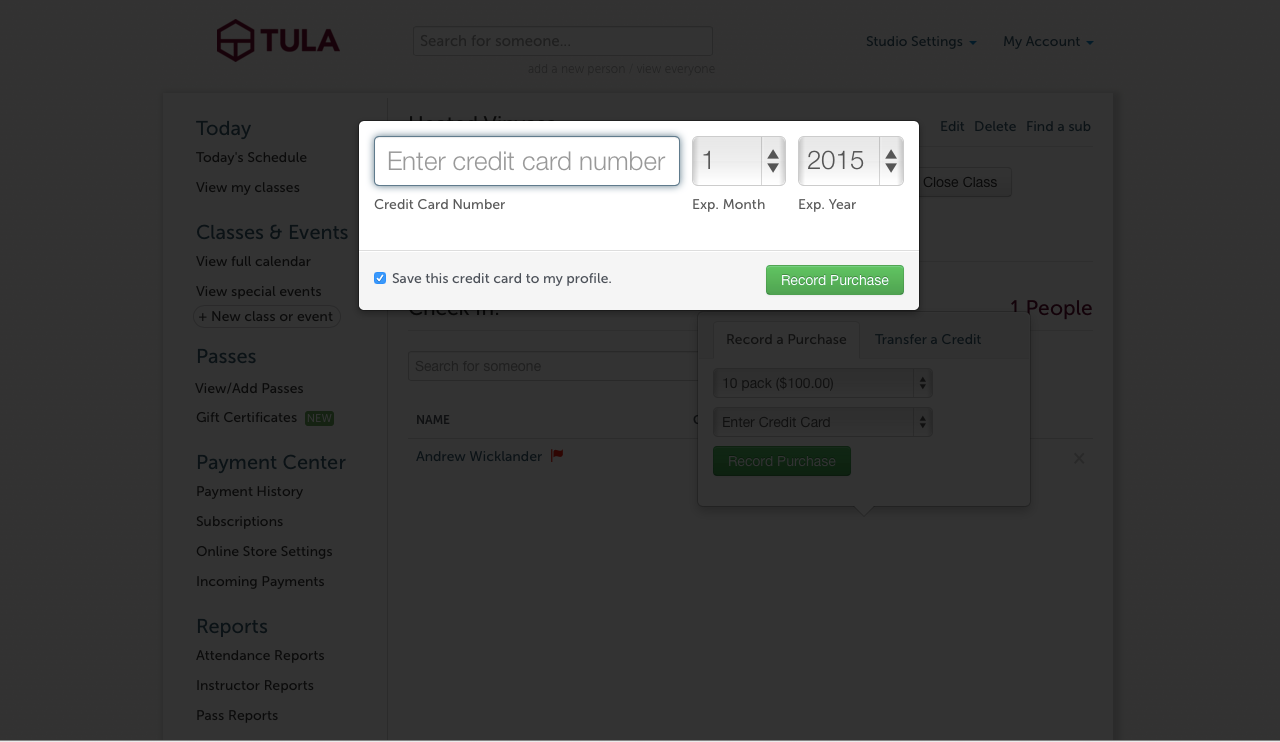
  2. We've introduced the new payment method of "Enter Credit Card"

When you choose the 'Enter Credit Card' option, you'll now be presented with a modal so you can quickly and easily enter in the credit card details without leaving the page you're on:

As mentioned above, we've preserved the option to record payments with an 'unsaved credit card' via an external system such as Amazon Local, Square, Shopkeep or any other point of sale system you might want to bring. We've always wanted Tula to be flexible enough for people who have another swipe system they want to use and so this option remains.

For those of you that want to leverage the connection to stripe even more though, now you have another option to quickly and easily conduct credit card charges and store your student cards.


Send your ClassPass registrations into Tula

We've been pretty vocal that we're very lukewarm on daily deal sites and discounts in general. We tend to think that things such as Groupon, LivingSocial, Amazon local and the mindbody connect app work to turn yoga studios into a commodity.

As such, we haven't spent much time doing development to integrate with these sites.

We've started hearing more and more about a company called ClassPass though, and they sounded intriguing to us. I was even speaking with a reporter about them the other day. I mentioned that while I haven't made up my mind about ClassPass yet, I looked at them differently than a daily deals site.

Why does ClassPass seem different to us?

For starters their members are limited to the number of times they can visit your studio each month, so they seem to have solved the firehose problem that the daily deal sites have. And while ClassPass does attract people that are willing to pay a monthly fee for their fitness routine, which are the best customers to have, they can't replace a membership at your studio.

I'm also particularly fond of the idea of how ClassPass can help introduce people with a fitness routine to the practice of yoga. I think getting more runners to learn about the benefits of yoga for example would be great.

Very most importantly though, we have customers that use ClassPass, who have decided it's good for their business, and their day to day routine of dealing with ClassPass registrations was more difficult than it needed to be.

So today we're happy to announce that if you use ClassPass, you can simply forward your registration emails into a custom studios address, we'll parse those emails, and we'll add the student to your registration list. It doesn't matter whether that person has a Tula account already or not, or whether they've been to your studio before.

We've leveraged the same powerful functionality that our payment matching and registration matching features use, and extended it so you can simply send your ClassPass emails to us. 

Once your comfortable with the process, you might even want to consider auto-forwarding all the emails.

Your custom studio address is available use immediately, and you can determine it by taking your studio subdomain and creating the following type of address: yourstudioname@inbound.tulasoftware.com.

If you've decided ClassPass is good for your business, we're thrilled that we can now make your lives a little bit easier as you handle your incoming registrations. And as always, if you need a hand just shoot us an email at help@tulasoftware.com.

iPhone 6 Updates Now Available

Another version of the Tula app has hit the app store, this time with all the updates for the iPhones 6 to account for the new screen sizes. We also pushed out a handful of small bug-fixes with this release, and all our customer white-label apps have received the updates as well.

Grab the latest version of the iPhone app on the app store, and for those of you with custom white-label apps be sure to tell your students to look out for the updates as well!

Footsteps, not clicks

One of the things that most inspires me, is when I see someone walking in our Chicago neighborhood with a yoga mat, headed towards Maile's studio.

We work in an industry where people measure clicks, page views and conversion rates. There are conferences about sales funnels, lead optimization and a host of other things that attempt to turn the art of making something extraordinary and valuable into a predictable science.

And yet the thing I think about most, is footsteps.

People who have built yoga studios, and the people who teach yoga, they do something so valuable that every day people stand up, change their clothes, and sometimes walk through snow storms to get to their yoga.

Think about that. Would you walk for 20 minutes through the snow, in 15 degree weather, to get to your Facebook page? How about to get to your favorite TV show? Questionable at best.  But every day I see people walking through our neighborhood to get to their yoga.

Why this matters is because we recognize that the point is to create something so valuable that people would walk through the snow to get to it - not to trick them into landing on your website with a different button color.

We're often asked how we're different. I don't know how to answer this sometimes, but I suppose one way is to talk about the things that inspire us.

And I find no inspiration in measuring clicks.

Footsteps on the other hand, those are inspiring.